Datasets
Shares commonalities with both the Elements and Segments functions and is associated with the Chemical Methods Ontology.
Reader: DesignerThe Datasets function shares commonalities with both the Elements and Segments functions, affording designers the ability to intricately design the user interface through the integration of Layers and Fields. Notably, the distinctive aspect of the "Datasets" function lies in its association with the Chemical Methods Ontology. To initiate the design of a Dataset, designers are required to first select the relevant Ontology. Subsequently, they can seamlessly begin shaping and refining the Dataset's user interface using Layers and Fields, thus offering a specialized and comprehensive approach to interface design tailored to chemical methodologies.
User Interface
Dataset Template List
Following the same approach of delivering a user-friendly user interface in a grid format, Dataset templates are displayed in a grid layout for the designer's ease of use.
- ✅ Sort the grid by clicking on the column headers.
- ✅ Filter the grid by clicking on the filter icon located at the right of the column headers. (Replaced by Quick Filter in LabIMotion v2)
- ✅ Quick Filter – Find templates by entering text. (Available since LabIMotion v2)
For a practical demonstration of sorting and filtering tasks in a list, designers can watch the video in the Element Template List section.
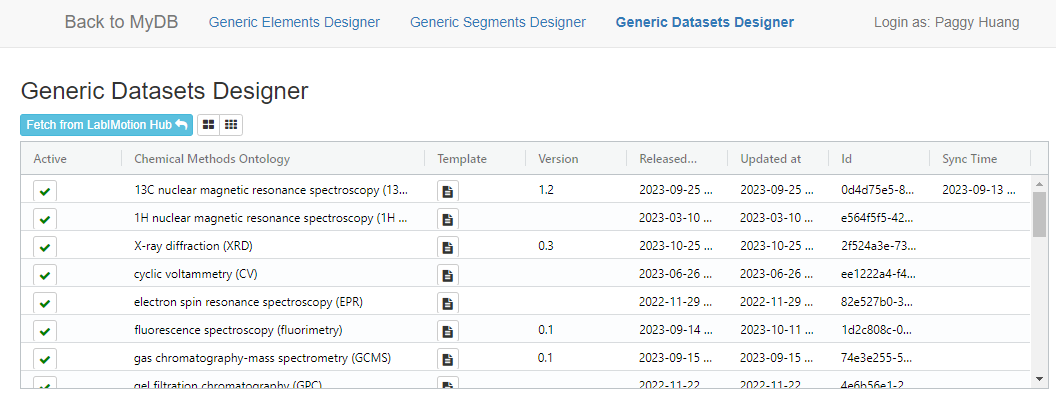
Dataset Attributes
Chemical Methods Ontology
A more readable, easily understood name presented to end-users, helping them recognize the dataset they are interacting with.
Version
The version number of the released element.
Released at
The timestamp indicating when the selected element was last released.
Updated at
The timestamp indicating the last update time of the selected element.
Id
The unique identifier of the selected element.
Sync Time
The most recent synchronization timestamp.