Preview & Versions
A feature that allows you to preview the design before releasing it to users and manage different template versions efficiently.
Reader: DesignerThe Preview & Versions feature provides a preview of the user's page, allowing designers to view the layout of a specific version by selecting it from the Version List on the left side.
Some components remain functional in this preview mode, such as entering text into a text component or selecting an option from a dropdown. However, certain interactions, like dragging and dropping a sample, may not work because they require an initial draggable item.
Designer - Preview Design
Version List
The Version List displays the latest 10 released template versions, including their unique version UUIDs and release timestamps in UTC format.
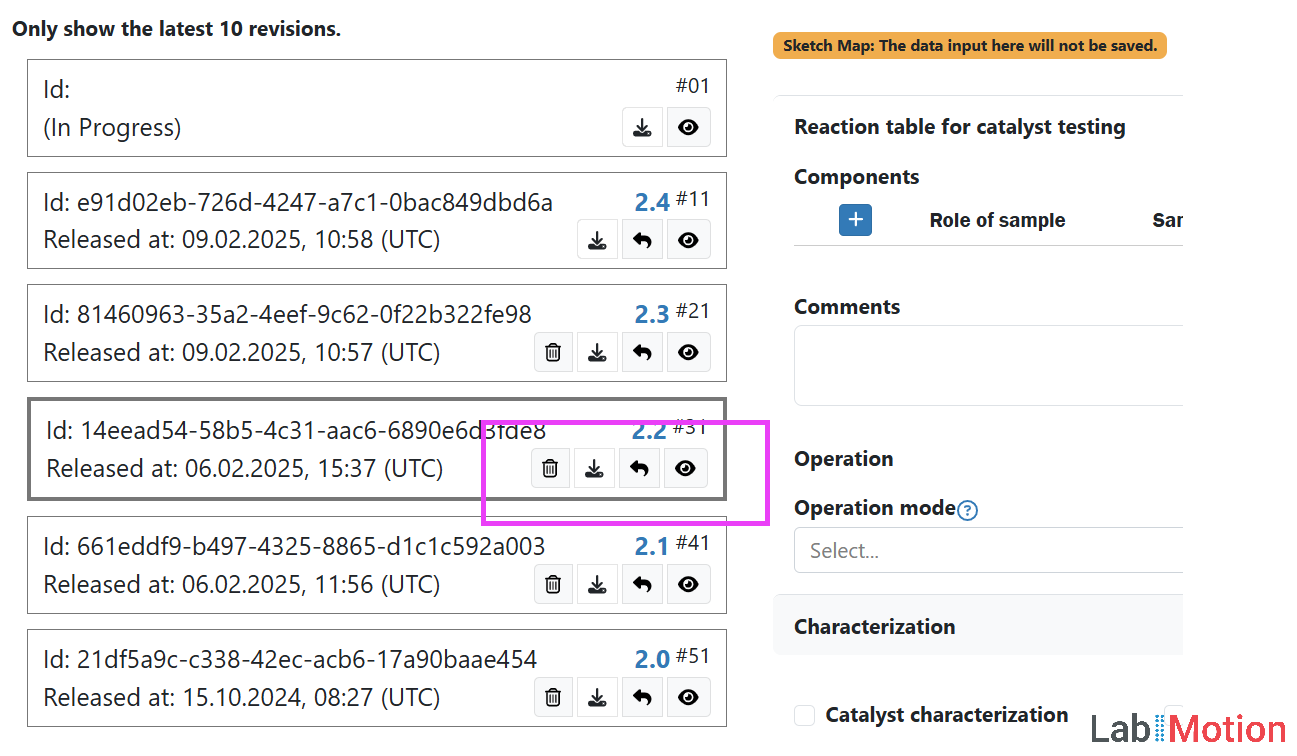
Designer - Version List
Version number
The version number is displayed in the format X.Y, where X represents the major version and Y the minor version, highlighted in blue.
Refer to the Save and Release guidelines for more information.
Preview this version
The preview feature is available not only for the current version but also for all versions.
Retrieve
Designers can retrieve each version of templates, and once retrieved, it will be in draft status. The designer needs to release it to use the retrieved version.
Download
Each version of the templates can be downloaded as a file. The file is in the .json format, and the file name is the system prefix plus template name plus the version UUID. For example, if the system prefix is abc, the template name is template1 and the version UUID is 123e4567-e89b-12d3-a456-426614174000, the file name will be abc_template1-123e4567-e89b-12d3-a456-426614174000.json.
Delete
Designers can delete the old versions if they do not want to keep them. However, please note that once deleted, this action cannot be undone.