DOI registration for templates
Reserve and release a citable DOI for a generic template, then find it in the Template Hub.
Reader: DesignerAny generic template can be given its own DataCite DOI, so that the template itself — not just the data recorded with it — becomes a citable object. This applies equally to element, segment and dataset templates: each Designer lists its templates with a DOI Info. column, and every row carries the same DOI button that opens the same dialog.
From that dialog you fill in the citation metadata, reserve a DOI, and later release it. Releasing publishes the template as its next major version to the Template Hub, where anyone can look it up, read its metadata and see what the template actually looks like.
Template DOIs are not registered on their own: they go through the Chemotion Repository's DOI
registration, under the same 10.14272 prefix as the collection, reaction, sample and analysis DOIs
the Repository mints for research data. DOI Issues explains how that registry works
and how its DOIs are structured.
A screen recording of this workflow will be embedded here. Until then, follow the written steps below.
Before you start
The DOI itself is minted by the Chemotion Repository, which holds the DataCite prefix and does the registering. The Designer collects the metadata and drives the workflow, but the identifier and the registry entry are the Repository's.
If you would like your templates registered, write to chemotion-labimotion@lists.kit.edu. The LabIMotion admins will get you set up and guide you through it.
You also need:
- a template that is ready to be published — an element, a segment or a dataset template;
- the metadata you want registered with the DOI: a title, a description, at least one author, and a licence.
1. Open the Designer
From the user menu at the top-right of the navigation bar (your name), choose Generic Designer, then open the Designer for the kind of template you want to publish — Elements, Segments or Datasets. Each opens a grid listing every template of that kind.
The grid's last column, DOI Info., carries a DOI button on each row. That button is the entry point to the DOI workflow for that template, and its colour encodes the state: plain when no DOI is reserved, blue once one is reserved, green once it has been released.

the DOI Info. column in a Designer grid
2. Open the DOI dialog
In your template's row, press DOI. A dialog opens, titled for that template, with its current status shown next to the title — Not reserved, Reserved or Released, each carrying the DOI version it refers to.
The dialog has three parts:
- Metadata — the Title, Description, Authors, optional Contributors and References, and the License that will be registered with the DOI.
- Versions — the Released DOI version, the Next DOI version, and the Current template version.
- Actions — Save metadata, Reserve DOI, Release DOI, Preview metadata XML and Close.
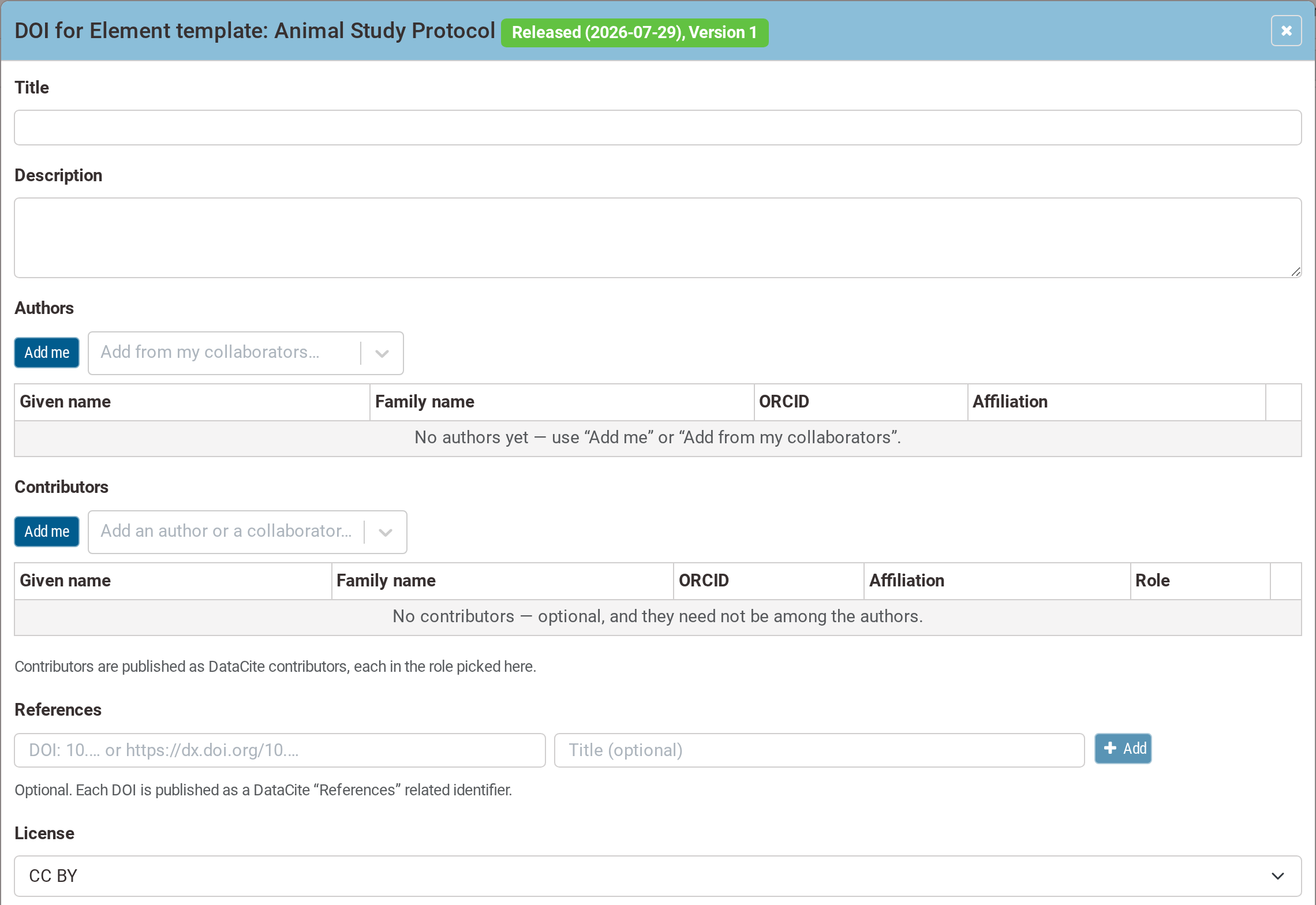
the DOI dialog (1 of 2) — the status badge and the metadata form
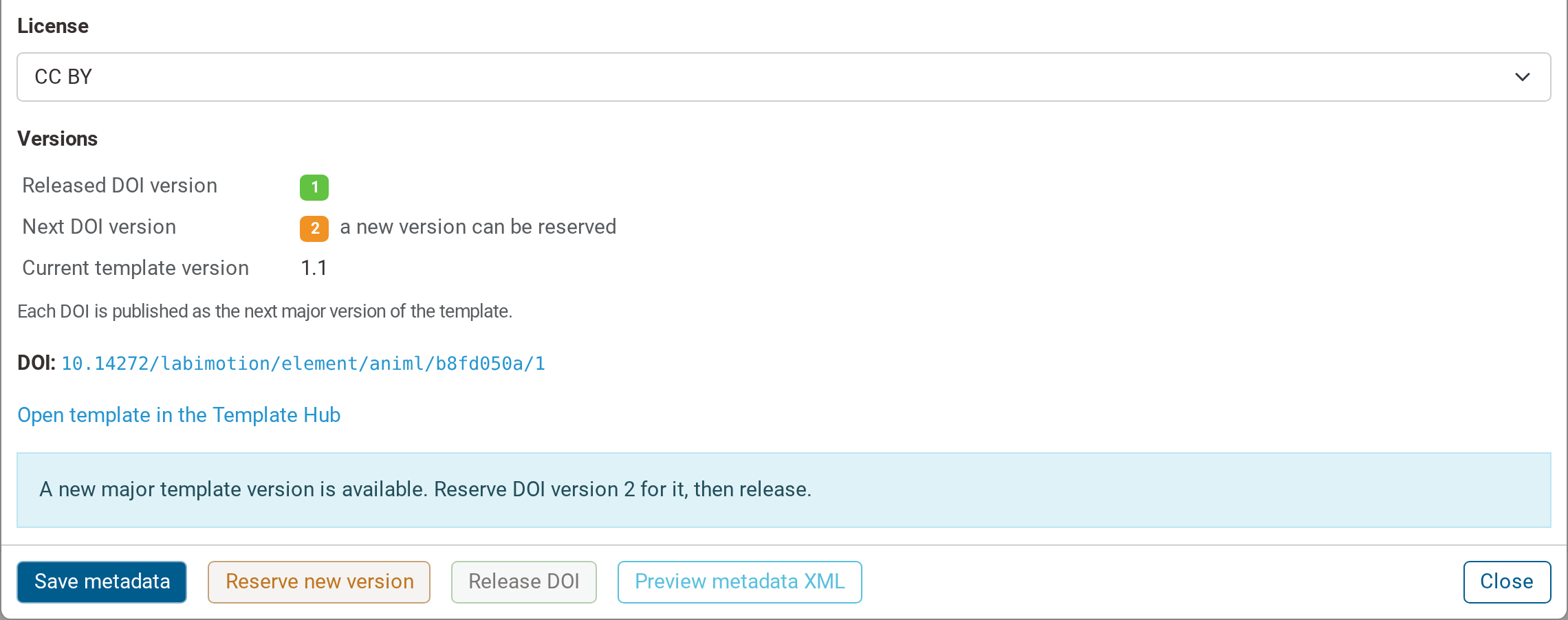
the DOI dialog (2 of 2) — the Versions block, the DOI and the footer actions
A DOI is pinned to a major template version, not to every edit. Minor revisions keep sharing the DOI they were released under; crossing a major boundary is what earns a new one.
| Template version | DOI version |
|---|---|
| 0.1 – 1.0 | 1 |
| 1.1 – 2.0 | 2 |
| 2.1 – 3.0 | 3 |
The last path segment of the DOI suffix is the DOI version — a suffix ending …/1 is DOI
version 1. So one DOI covers a range of template versions, and a reader can tell which range from
the DOI alone.
A released DOI is frozen: its metadata form becomes read-only. The form unlocks — and Reserve DOI becomes Reserve new version — only once the template has moved on to a new major version. The Versions block tells you where you stand: which DOI version is released, which one is next, and where the template version currently sits.
3. Fill in the metadata
- Title — a human-readable name for the template.
- Description — what the template captures, and which standard or protocol it follows.
- Authors — add yourself with Add me, or pull people in with Add from my collaborators…. Each author row carries a given name, family name, ORCID and affiliation. At least one author is required. Author details are drawn from your account and your collaborators, so keep your ORCID and affiliations up to date.
- Contributors and References — optional.
- License — choose the reuse licence: CC BY-SA, CC BY (the default), CC0 or No License.
Press Save metadata to store what you have entered. You can reopen the dialog and revise the metadata as often as you like before the DOI is released.
4. Reserve the DOI
Press Reserve DOI. This creates and reserves the DOI locally, with its final, deterministic suffix — the identifier is settled from this moment on, so you can already quote it in a manuscript or a preprint, and it is the same identifier that will later be minted.
Nothing has reached DataCite yet. Reserving allocates the identifier and lets you preview the record; the external registry is contacted only at release.
Once a DOI is reserved, Release DOI and Preview metadata XML become available, and you can use Preview metadata XML to inspect the exact DataCite record that will be published.
Reserve DOI is not a preview or a draft you can back out of — it writes a real local record and fixes the exact suffix that will later be minted. There is no unreserve action. The only thing reserving does not do is contact the external registry.
5. Release the DOI
When the metadata is final, press Release DOI. This is the step that reaches the outside world:
- it creates the record at DataCite, so the DOI resolves and is findable;
- it publishes the template as its next major version to the Template Hub, where the released version and its DOI now appear.
The registry is contacted exactly once, at release — and a released DOI cannot be deleted. You can update the metadata or the target of a released DOI later, but you cannot un-publish it. Release only when the template and its metadata are genuinely final.
6. Find the published template in the Template Hub
The Template Hub's Find a Template view is how a reader gets from a DOI to the thing it identifies. It asks for three things in order, each unlocking the next:
- Template type — Generic Element, Generic Segment or Generic Dataset
- Template name / label — listed by label, so look for the human-readable name
- Release version — shown as
v1.0 (released …), defaulting to the newest
It then renders a card with the template's metadata — type, name, label, description, prefix, version, released date, identifier and DOI, with Copy DOI and a Metadata XML download of the DataCite record — followed by Example: the template's real form, rendered live and interactively, layer cards and all.
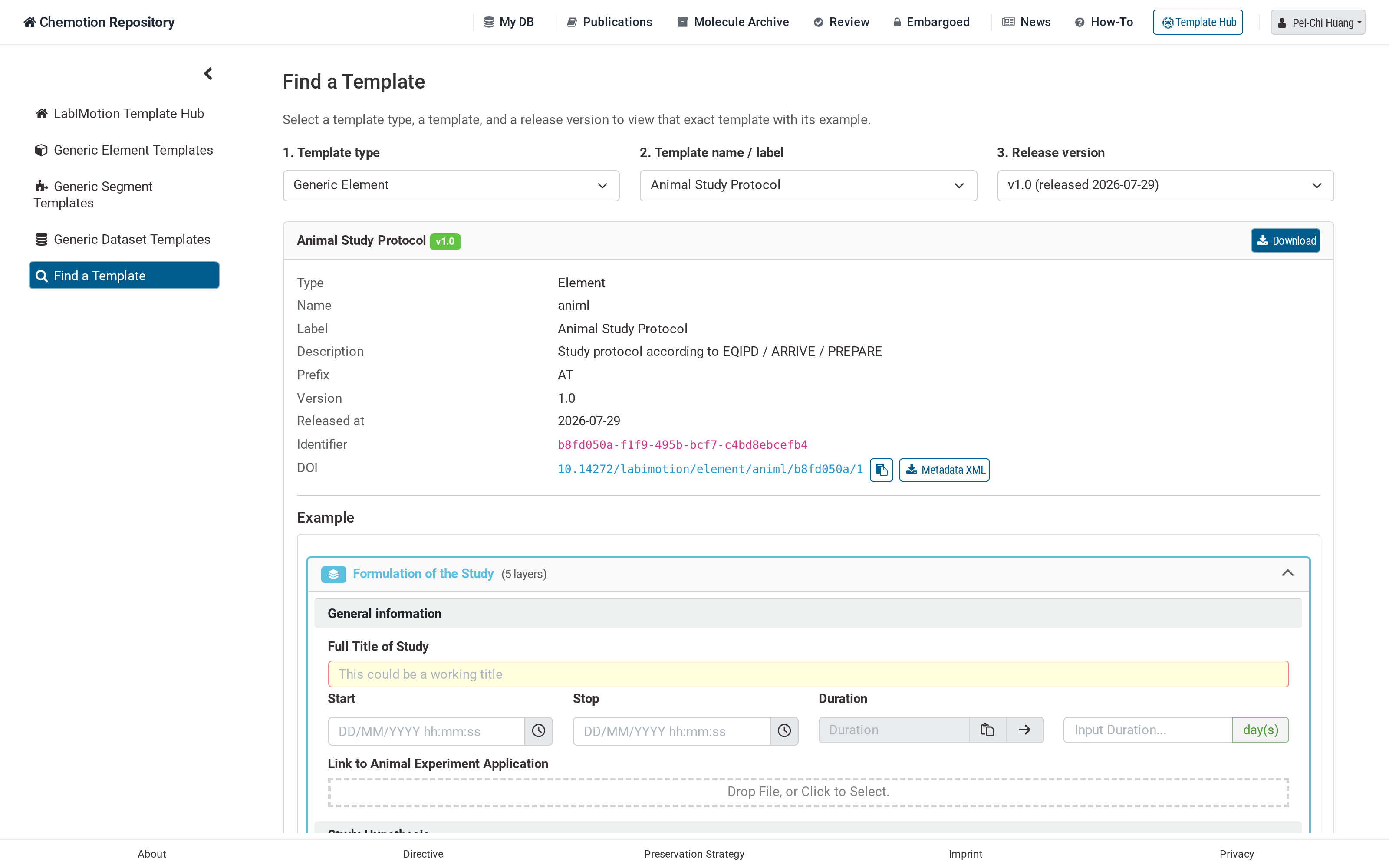
Find a Template, showing a template's metadata and live Example preview
That view is also the DOI's landing page. A released DOI is registered against a deep link into this finder, with the type, template and version pre-selected, so following the DOI takes a reader straight to the publisher metadata and to a working preview of the template — rather than to a bare record.
From here, any Designer on another instance can synchronise the template into their own instance — see Template Sync & Publish.
The DOI lifecycle at a glance
Three states, and the transitions between them run one way only.
| State | What exists | Reached by | Public? | Reversible? |
|---|---|---|---|---|
| Not reserved | Citation metadata only, if you have filled any in. No identifier allocated. | — | No | Metadata can be edited and saved again |
| Reserved | A local DOI record with the final, deterministic suffix. The DOI can already be quoted in a manuscript or preprint. DataCite has not been contacted. | Reserve DOI | No — it does not resolve yet | No — there is no unreserve |
| Released | The record is created at DataCite. The DOI resolves, is findable and is citable, and the template version is published to the Template Hub. | Release DOI | Yes | No — a released DOI is permanent |
Because the suffix is settled at reserve time, the identifier you cite before publication is the same one that ends up in DataCite afterwards.
Questions and support
Any question about this workflow — the metadata, the DOI, versioning, or finding a published template — reaches us at chemotion-labimotion@lists.kit.edu. You can also file an issue or start a thread on the discussion board.
Neither reserving nor releasing can be undone, so ask before you press them rather than after.