FAQ & Troubleshooting
This page is still being edited and reviewed.
Users who need help with the ChemConverter can find it right here!
Troubleshooting
I cannot create a profile on the admin GUI (Webserver does nothing or ERROR Message)
-
Answer: There can be multiple reasons, but the most common are:
- The user is trying to upload a binary file (not supported yet!)
- There's no reader (yet) for the specific data type and the standard reader doesn't work either.
- The user is in the wrong menu, please press the right button.
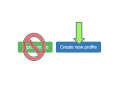
I created a profile for my data file on the admin GUI but after uploading it to the ELN it will not be converted.
- Answer: If the user is sure that the reason is not the converter itself (because the user tested it on a standalone version and it works), the Chemotion team needs to add the file extension/type to the whitelist. Please let the team know.
Even after choosing a suitable data type (and a correct conversion) the ELN says "Preview not available" and/or "Spectra Editor: Reprocess"

-
Answer: The two common mistakes occur if there
- was a freeze, loss of connection or other bug during the upload or the conversion process. The user can try to click on the orange button to regenerate the spectra.
- isn't a working layout for this technique yet. The user can wait for the next update and try again later or help the Chemotion team create a suitable layout.
-
Workaround: Just to have basic features for looking at the curves, using an already more accomplished layout like CV, UV/VIS or NMR is recommended.
Frequently Asked Questions (FAQ)
Why using .jdx and not e.g. .csv for the converter output?
-
Answer: There are mostly two reasons:
- Jcamp .jdx is well known and used among chemists and companies (like Bruker), belongs to the IUPAC and is standardized with multiple extensions.
- CSV is not!
What data formats are supported as input
-
Short answer: Almost all common non-binary files (txt, csv, dta ...) are supported, at least with basic features.
-
Long answer: The Chemotion team encourages users to look at the reader documentation page. It also lists readers with advanced features.
I'm a (LabView, Simulink, Matlab ...) developer, coder or IT person. Are there any guidelines how to design the output files of my test stand / experiment / script?
- Answer: Of course there are, and the Chemotion team is happy to help users against closed, unreadable and proprietary data! Therefore, a document with simple and basic guidelines (currently in beta status) was created.
Your Questions
Users with access to GitHub can post their questions there, and they may become part of the next Q&A update or be answered by another user.