Authentication in Chemotion
This page provides comprehensive instructions for all configurations related to user authentication.
The default authentication method for Chemotion is database authentication, allowing users to log in with an email address or acronym. Passwords in Chemotion are encrypted.
Database Authentication
This method involves hashing and storing a user's password in the database. When a user attempts to sign in, the system validates their authenticity by comparing the entered password, once hashed, with the stored hash. This process ensures that sensitive password information is never stored in plain text, enhancing the security of user data.
Third-Party Authentication
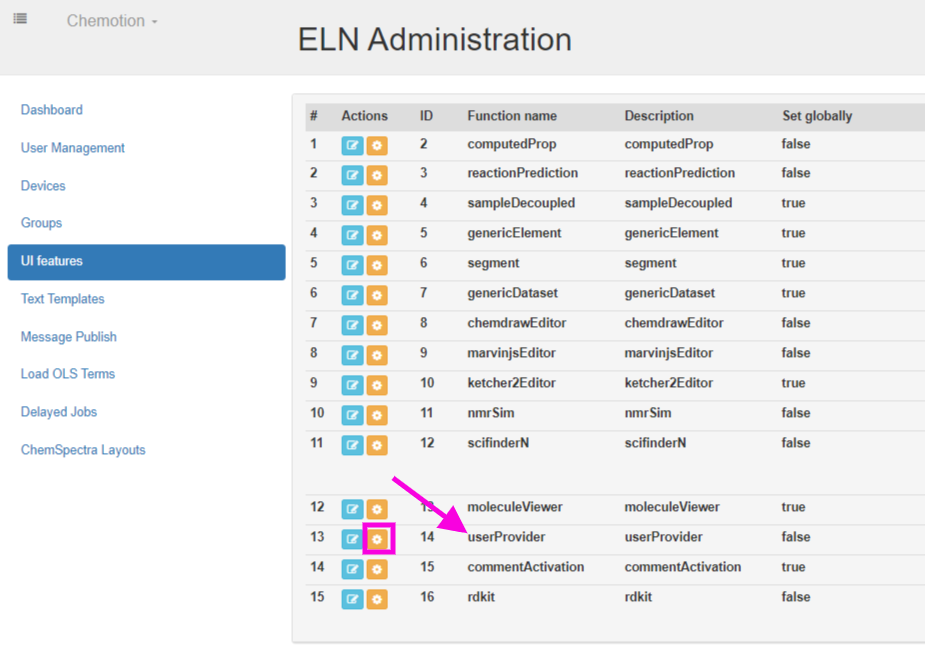
The Chemotion team also offers third-party authentication options, including Shibboleth, OIDC (Open ID Connect), ORCID, GitHub, and NFDI AAI. To configure these options, visit the Chemotion Administration page. On the left side, under 'UI Features', find the function labeled 'User Provider'. Click on the yellow 'Edit JSON' button to access the configuration settings.
Shibboleth
{
  shibboleth: {
    enable: false,
    uid: 'pairwise-id',
    email: 'mail',
    last_name: 'sn',
    first_name: 'givenName'
  }
}
Parameters
| Parameters | Value | Description |
|---|---|---|
| enable | true or false | |
| uid | 'pairwise-id' | |
| 'mail' | ||
| last_name | 'sn' | |
| first_name | 'givenName' |
OIDC (Open ID Connect)
{
  openid_connect: {
    enable: true,
    host: "oidc.address.edu",
    icon: "path/to/image.png",
    issuer: "https://oidc.address.edu/path/to/issuer",
    scheme: "https",
    client_id: "myClientID",
    redirect_uri: "https://chemotion.dept.uni.de/users/auth/openid_connect/callback",
    client_secret: "secret",
    token_endpoint: "/oauth2/token",
    authorization_endpoint: "/oauth2/auth"
  }
}
Parameters
| Parameter | Value | Description |
|---|---|---|
| enable | true or false | |
| host | address of the service | |
| icon | path to a public image to display on the sign-in page | |
| issuer | URL of the issuer | |
| scheme | https | |
| client_id | client ID | |
| redirect_uri | your Chemotion ELN URL + '/users/auth/openid_connect/callback' | |
| client_secret | secret | |
| token_endpoint | /oauth2/token | |
| authorization_endpoint | /oauth2/auth |
ORCID
{
  "orcid": {
    "enable": false,
    "client_id": null,
    "client_secret": null,
    "icon": null,
    "label": null,
    "member": false,
    "sandbox": false
  }
}
Parameters
| Parameters | Value | Description |
|---|---|---|
| enable | true or false | |
| client_id | string | From the ORCID application |
| client_secret | string | From the ORCID application |
| icon | string | Optional icon for the sign-in button |
| label | string | Optional text for the sign-in button |
| member | true or false | Whether the ORCID account is a member account |
| sandbox | true or false | Use ORCID's sandbox instead of the live service |
GitHub
{
  "github": {
    "enable": false,
    "client_id": null,
    "client_secret": null,
    "icon": null,
    "label": null
  }
}
Parameters
| Parameters | Value | Description |
|---|---|---|
| enable | true or false | |
| client_id | string | From the GitHub OAuth application |
| client_secret | string | From the GitHub OAuth application |
| icon | string | Optional icon for the sign-in button |
| label | string | Optional text for the sign-in button |
NFDI AAI
The ELN supports third-party login methods, including Shibboleth and OpenID Connect. Since NFDI AAI RegAPP uses OpenID Connect, it can be used with the ELN. The integration of Chemotion with NFDI AAI RegAPP has been successfully tested and is now available on the labimotion test instance.
Instructions for applying for a client ID for Your Instance:
Please send an email to chemotion-nfdi-aai@lists.kit.edu with the following information:
- Your Institution name (e.g., Karlsruhe Institute of Technology)
- Your FQDN (Fully Qualified Domain Name) (e.g., https://chemotion.dept.uni.de)
- ELN Version
{
  openid_connect: {
    enable: true,
    host: "regapp.nfdi-aai.de",
    label: "NFDI AAI",
    issuer: "https://regapp.nfdi-aai.de/oidc/realms/nfdi",
    scheme: "https",
    client_id: "myClientID",
    redirect_uri: "https://chemotion.dept.uni.de/users/auth/openid_connect/callback",
    client_secret: "secret",
    token_endpoint: "/oauth2/token",
    authorization_endpoint: "/oauth2/auth"
  }
}
Parameters
| Parameter | Value | Description |
|---|---|---|
| enable | true or false | |
| host | regapp.nfdi-aai.de | address of the service |
| label | NFDI AAI | label of the login button |
| icon | path to a public image to display on the sign-in page | |
| issuer | https://regapp.nfdi-aai.de/oidc/realms/nfdi | URL of the issuer |
| scheme | https | |
| client_id | client ID | Please send an email to chemotion-nfdi-aai@lists.kit.edu |
| redirect_uri | your Chemotion ELN URL + '/users/auth/openid_connect/callback' | |
| client_secret | secret | |
| token_endpoint | /oauth2/token | |
| authorization_endpoint | /oauth2/auth |